 Author :

Many people use the words “certificate” and “digital credential” interchangeably, and it’s easy to see why. Both are used to recognize an achievement, and both can be delivered digitally. But the similarity stops there. A certificate and a digital credential serve very different purposes, especially when verification and public sharing matter.
This article explains the difference in simple, straightforward terms, without any technical jargon. If you work in higher education, corporate training, HR, associations, or professional development, this will help you understand what each option actually does and when to use it.
Digital Credentials: A Verifiable Version of Achievement
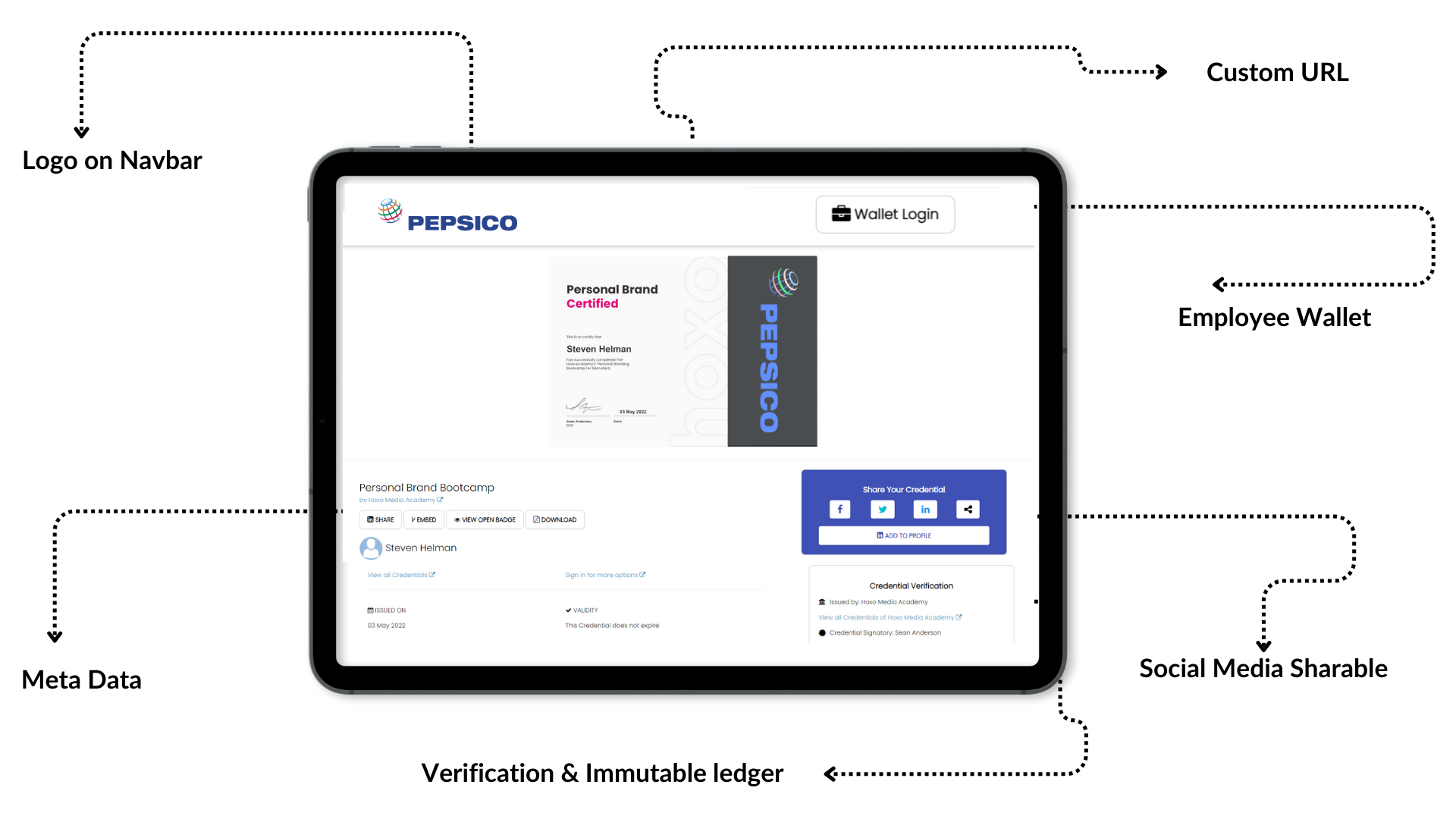
A digital credential takes the idea of a certificate and adds verification and security to it. Instead of being a static document, it is an online record that contains structured details about the achievement regarding who issued it, what the learner completed, when it was issued, and the criteria behind it. This information is stored in a way that prevents tampering.
Digital credentials follow global standards such as W3C Verifiable Credentials and Open Badges. These standards allow anyone to click a digital credential and immediately confirm that it came from the organization that issued it. There’s no need to email someone for verification, check with a department, or search through files. The credential itself provides the proof.
Another major difference is how easily a digital credential can be shared. Instead of downloading and uploading a PDF, the learner can share it to LinkedIn or other platforms in one or two clicks. This convenience makes people far more likely to showcase their learning publicly.
Platforms like CertifyMe help organizations create and issue these verifiable credentials without requiring deep technical knowledge. The platform handles the verification link, the secure metadata, and the experience for the learner.
Certificates: A Basic Record of Completion
A certificate is the format most people are already familiar with. It’s usually a document, printed or saved as a PDF that confirms someone finished a course, attended a workshop, or met certain requirements. Its main role is to acknowledge participation or completion.
Certificates are simple to issue and easy for learners to keep. But they are also static. Once the document is created, nothing in it can change or update. It does not contain built-in information about how to verify that it’s genuine. And because it is just a file or a piece of paper, it is possible for someone to modify or duplicate it without much difficulty.
For many low-stakes situations, this is perfectly fine. If the purpose is only to give someone a basic acknowledgment, a certificate does the job. But if you need something that can be trusted, verified, or shared publicly online, a certificate has clear limitations.
Why People Often Get Confused
Much of the confusion comes from the fact that certificates can also be delivered digitally. When someone hears “digital credential”, they often assume it’s the same thing as a digital certificate — just a PDF sent through email. The two can look similar at first glance, but the underlying structure is completely different.
A certificate is essentially a design file. A digital credential is an online proof of achievement.
That difference matters most when accuracy, trust, and public visibility are important, such as course completions, competencies, micro-credentials, professional certifications, and university-level recognition.
The Practical Differences That Matter
Although certificates and digital credentials both recognize achievement, they behave very differently in practice.
The table below highlights the distinctions that matter most to learners and issuers. It focuses on factual differences without adding any unnecessary explanation, so you can see clearly what each format does and doesn’t offer.
| Category | Certificate (PDF or Printed) | Digital Credential (Verifiable) |
|---|---|---|
| Format | Static document | Online record with structured data |
| Security | Can be edited or duplicated easily | Designed to be tamper-resistant |
| Verification Method | Requires manual checking | Instant verification through a link |
| Issuer Workload | Verification requests handled individually | Verification is automated |
| Sharing Method | Download → upload → attach | One-click sharing to digital platforms |
| Visibility | Limited public presence | Easily discoverable when shared online |
| Learner Engagement | Typically low | Often higher due to simple sharing |
| Data Included | Basic information only | Metadata such as criteria, skills, issuer, and dates |
| Compliance / Standards | Not based on a global standard | Can follow W3C VC and Open Badges standards |
| Trust Level | Relies on the appearance of the document | Relies on verifiable proof |
| Use in External Review | Requires contacting the issuer | Reviewers can verify independently |
| Longevity | May be misplaced or altered | Remains accessible and consistent over time |
Table Comparison : Certificate vs Digital Credential
So When Should You Use Each One?
Neither format is “better” in every situation. They simply serve different purposes.
Certificates work well when the requirement is light and the goal is acknowledgment rather than proof. Many workshops, short programs, and internal training sessions fall into this category.
Digital credentials are more suitable when the achievement needs to be trusted by others, when verification matters, or when you want learners to share their accomplishments online. They offer a level of reliability and convenience that certificates cannot match, especially at scale.
The Best Way to Understand the Difference
Reading about the difference helps, but seeing a digital credential makes it much clearer. You can explore a sample digital credential on the CertifyMe website to get a sense of what it looks like, how verification works, and what learners experience.
If you want a hands-on feel, you can also create a free account on CertifyMe and issue a test credential to yourself. This lets you see the workflow from the issuer’s side and the learner’s side.
If you later decide that your organization needs a more advanced credentialing system, you can request a demo from the CertifyMe team to understand the options.