 Author :

Scanning a QR code on a digital credential takes a verifier directly to the live credential record, bypassing any risk of an altered or forged document being presented. It’s the fastest and most accessible verification method available, requiring nothing more than a smartphone.
This article explains exactly how the process works, step by step, and the role a digital wallet plays in storing and sharing credentials.
TL;DR
-
A QR code on a verifiable credential stores a secure live link tied to the original credential record — so even if a recipient shares a PDF, scanning the QR code leads the verifier to the live, unalterable version.
-
Scanning redirects the verifier to a verification page showing the recipient’s name, signatory, issue date, and a unique Ledger ID, which can be cross-checked against the PDF the recipient shared.
-
From that page, verifiers can access the live credential directly and use additional verification methods for deeper validation if needed.
-
A digital wallet lets recipients store multiple credentials from different issuers in one place, while issuers retain the ability to revoke, expire, or update credential status at any time.
How QR Code Verification Works
A QR code stores data in a scannable format. On a digital credential, it stores a secure live link connected to that specific credential record. The moment someone scans the code, they’re taken directly to the live credential page — not a copy, not a static file, but the actual hosted record.
This matters even when a PDF is shared. If the credential was issued through a platform like CertifyMe, the QR code on the PDF leads directly to the live version. A forged or altered PDF would still carry the original QR code, and that code would reveal the discrepancy immediately. The broader mechanics of how blockchain digital credentials store and protect these records explain why the live version can’t be quietly altered.
Here’s how the process unfolds from issuance to verification.
Step 1: QR Code Generation at the Time of Issuance
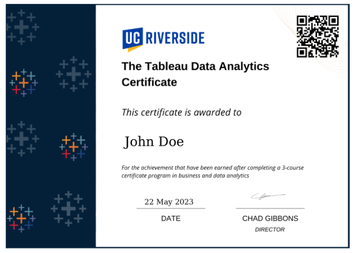
When a credential is issued, a unique QR code is generated at the same time and placed directly on the certificate. The QR code is linked to four key details:
- Who the credential is issued to
- Who the signatory is
- The date of issuance
- A unique Ledger ID
The Ledger ID is particularly important. It’s the identifier that ties the QR code to a specific entry in the credential record, and it’s what enables independent verification without contacting the issuer.
Step 2: Scanning and Initial Verification
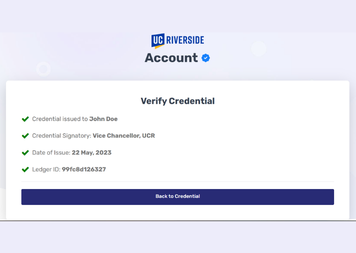
When a verifier scans the QR code — from the PDF, a printed copy, or a screen — they’re taken to a verification page. That page displays the same four details embedded in the QR code:
- The recipient’s name
- The signatory
- The date of issuance
- The Ledger ID
The verifier can compare these details directly against the PDF the recipient shared. If anything was altered in the document, the mismatch is visible immediately.
Step 3: Accessing the Live Credential
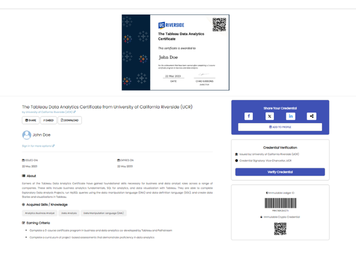
From the verification page, the verifier has two paths forward. They can copy the Ledger ID and paste it into the issuer’s official verification portal, or they can click directly through to the live credential. The live credential gives access to three additional verification methods beyond the QR scan itself.
A full breakdown of all verification methods for digital credentials covers each method and when to use them.
The Role of the Digital Wallet
The live credential is a hosted version of the certificate, accessible through its unique URL or QR code. For a recipient managing multiple credentials from different issuers — a university degree, a professional certification, a training badge — keeping track of separate links quickly becomes impractical.
A digital wallet solves this. It’s a secure digital space where a person stores all their credentials in one place, regardless of which institution issued them.
A clear real-world example is the Europass wallet used across EU member states. A person can store credentials from a university, a school, a driving license authority, and various training bodies all within the same wallet. When verification is needed, they select the relevant credential and share it. The privacy dimension of this model — how wallets give holders control over what they share and with whom — is covered in detail in our guide on verifiable credentials and online privacy.
From the issuer’s side, the wallet model doesn’t remove control. Universities, schools, and licensing authorities can still revoke, expire, or update the status of any credential they’ve issued, regardless of where it’s stored. That status change reflects immediately when the credential is next verified.
Want to See It in Action?
The steps above describe a process that takes seconds in practice — scan, view, confirm. But reading about it and experiencing it are different things.
If you issue credentials and want your recipients to have this kind of verifiability, platforms like CertifyMe support QR-based verification alongside three other independent verification methods.
There’s a free plan available to test how issuance, live credential hosting, and wallet-based storage work together before committing to a full rollout. The QR scan is just the entry point. Once a verifier reaches the live credential, the full verification infrastructure is right there.